Overview
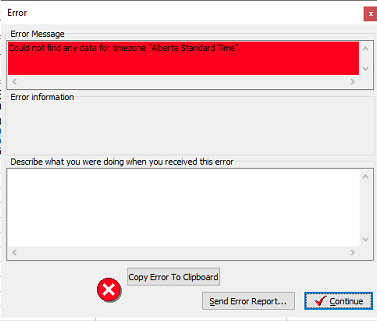
With several new time zones coming into effect in November, 2026 in Western Canada. Users of System Five may be presented with the following error Could not find any data for time zone "British Columbia Standard Time" based on a workstation being configured for a new standard timezone.
Solution
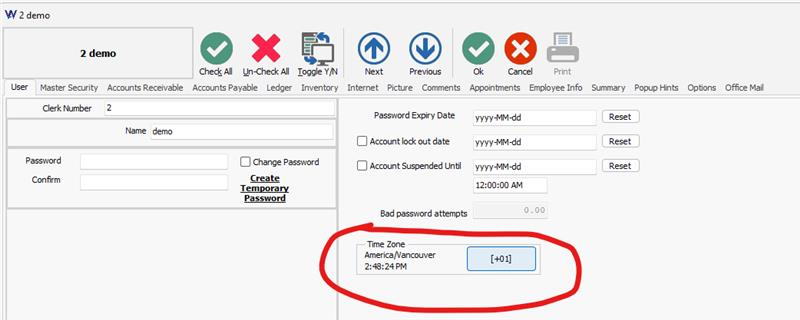
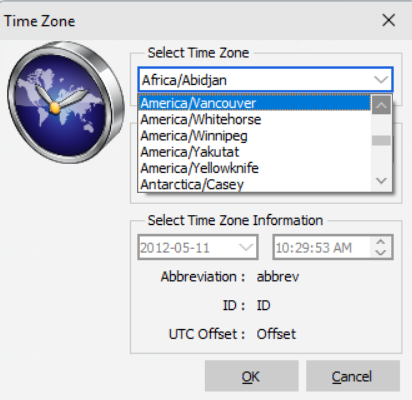
Set each users time zone to their respective region such as America/Vancouver or America/Edmonton. System Five will not need to look up the new windows time zone.
NOTE: You will need to have the workstation operating system configured to the old time zone prior to being updated to make the changes to your users. Once you have updated your users, you can set your workstation time zone.
- From the Navigate menu choose "Setup Tools"
- Choose Configuration and then choose Users and Security.
- Double click on each user
- CLick on the "Time zone" button.
- From the dropdown choose an appropriate region for the user such as America/Vancouver or America/Edmonton.
- Click OK on the user to save the settings.