Overview
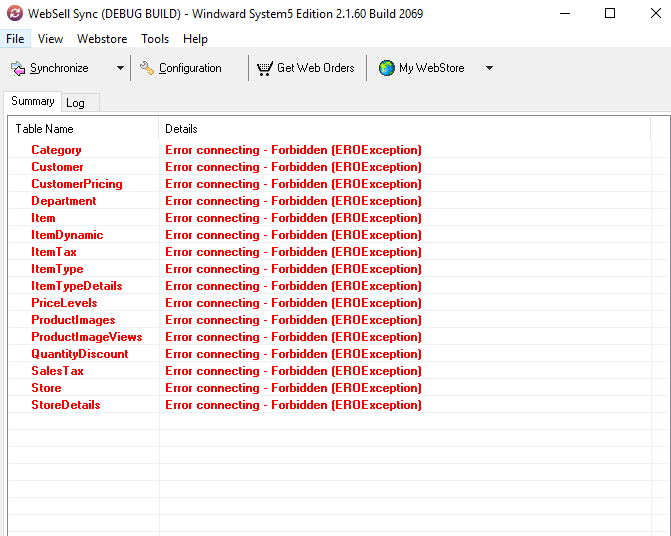
The “Error connecting – Forbidden (ER0Exception)” message in WebSell Sync indicates that the sync application is able to reach the WebSell service, but WebSell is actively rejecting the connection due to an authorization or permission issue.
This is not a connectivity failure or a System Five database issue. It is an access denial returned by the WebSell side.
For assistance with investigating and resolving this error, connect with WebSell Technical Support through Microsoft Teams to review authorization, account status, and backend access issues.
Symptoms
Customers may report one or more of the following:
- WebSell Sync fails across all tables (Items, Categories, Pricing, Images, Stores, Taxes, etc.)
- The same error appears repeatedly for multiple sync attempts
- Restarting the WebSell Sync service temporarily restores functionality
- The error returns after several hours or days of uptime
- No System Five errors or crashes are observed
Recommended Troubleshooting Steps
Step 1: Confirm Scope
Verify that the error appears across multiple or all tables in WebSell Sync.
Step 2: Restart (Temporary Workaround)
Restarting the WebSell Sync service may temporarily restore functionality. This is a workaround, not a fix.
Step 3: Escalate
If the error recurs after a restart:
- Treat this as a WebSell authorization issue
- Escalate or initiate a warm handoff to WebSell support
- Provide logs, timestamps, and screenshots of the Forbidden error
Step 4: Set Expectations
Inform the customer that:
- The issue is related to WebSell authorization
- Restarts only provide temporary relief
- Investigation or correction must occur on the WebSell side
Escalation Guidance for Support
Escalate immediately when:
- The error is Forbidden
- It affects multiple or all tables
- It recurs after one restart
Do not loop repeated restarts without escalation.