How to Fix Stock Transaction Issues in Windward System Five (Version 7)
A toolbox routine has been create to re-convert invoices and department transfers created within a specified date and time. This will write missing stock transaction routines that were missed due to a defect introduced in version 7.0.070-7.0.0.76.
Once your System Five has been updated, there will be a few steps you need to follow in order to correct inventory quantities. This is a two-step process involving the Toolbox Routine and the Inventory Integrity Check.
*Note: These steps should be attempted in your training dataset first to ensure expected results.
*Note: Please ensure a back-up is performed prior to attempting this in your live dataset.
Steps to Fix Stock Transaction Errors in Windward System Five V7
Step 1:
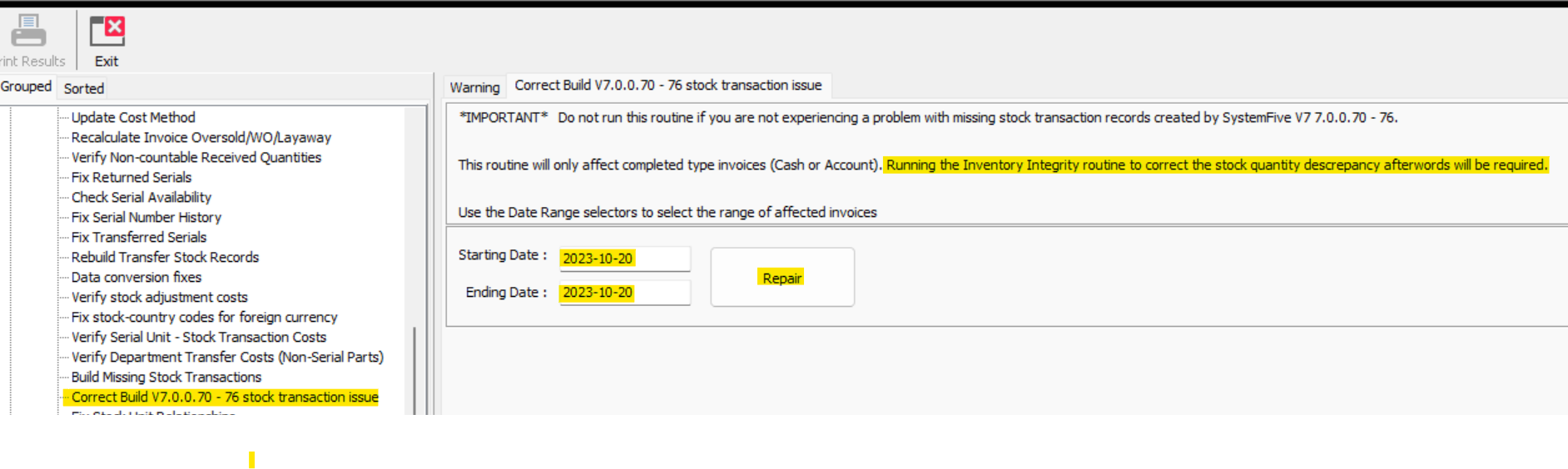
- Open "toolbox routine" -> "inventory routines" -> "stock control routines" -> "Correct V7 7.0.0.70 -76 stock control issues"
- Select the date range of invoices or department transfers affected (the date the first invoice was affected to the last date)
- Once the date range is determined, click "repair"
- This will output a list of invoices and transfers the routine has affected
 Step 2:
- Once the routine is completed, the Inventory Integrity Report needs to be run
- Go to "general ledger" -> "integrity checks" -> "inventory integrity"
- De-select "check all" and set the "book month" to the affected period
- In the right-hand menu, select "fix inventory stock quantities"


Once these steps are complete, review inventory to ensure results are correct.
*If there are any issues or questions, please contact Windward Support for further assistance.