Troubleshooting: Unable to Uninstall a Program on Windows
Overview
If you are unable to uninstall a program in Windows and receive unexpected prompts or error messages, the issue is often caused by a corrupted or missing Windows registry key. This can prevent standard uninstall processes from completing successfully.
This article explains the issue and provides the official Microsoft troubleshooting resource to resolve uninstall problems.
Common Symptoms
- Windows will not allow you to uninstall an application.
- You receive a strange or unexpected error prompt when attempting to uninstall.
- The uninstall process begins but fails before completion.
Example:
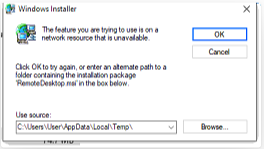
In the original case reported, attempting to uninstall Remote Desktop resulted in an unusual prompt, indicating a network resource is unavailable.
Troubleshooting Steps to Fix Uninstall Issues
Step 1: Review the Error Message
- Attempt to uninstall the program through Windows Settings > Apps or Control Panel > Programs and Features.
- If the uninstall operation fails or displays an unusual prompt, proceed to Step 2.
Step 2: Use Microsoft’s Official Program Install & Uninstall Troubleshooter
Microsoft provides an automated tool that repairs registry corruption and fixes issues that block software from being installed or removed.
- Open the official Microsoft support tool here:
https://support.microsoft.com/en-au/topic/fix-problems-that-block-programs-from-being-installed-or-removed-cca7d1b6-65a9-3d98-426b-e9f927e1eb4d - Download and run the troubleshooter.
- Follow the prompts to automatically detect and resolve uninstall-related issues.
Summary
Using Microsoft’s Program Install & Uninstall Troubleshooter resolves issues in most cases and allows you to successfully remove the affected software.