How to Reset Your Windward Customer Care Portal Password
Overview
The Windward Software Customer Care Portal provides access to Knowledge Base articles, support ticket submissions, ticket status updates, and ticket reopening options. It also sends email notifications as your support request is worked.
Resetting Your Windward Customer Care Portal Password
Steps to Reset Your Password
1. Open the Windward Customer Care Portal Login Page
Go to: https://support.windwardsoftware.com
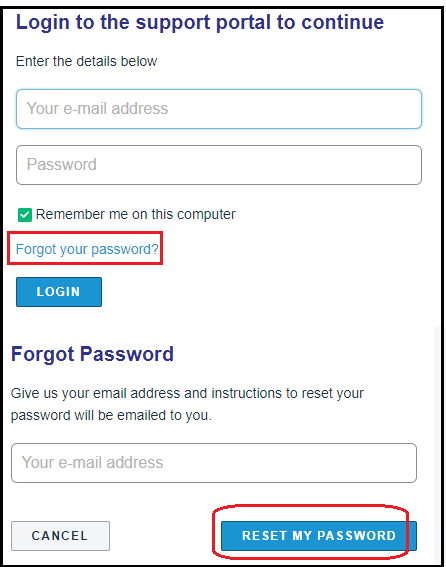
2. Click “Forgot your password?”
Select the Forgot your password? link on the login screen.
3. Enter Your Email Address
Enter the email address associated with your Windward Customer Care account.
4. Click “RESET MY PASSWORD”
Instructions to reset your password will be emailed to you.
Request a Customer Care Account
1. Open the Link Below and Fill out the "Request a Customer Care Account" Form
REQUST CUSTOMER CARE ACCOUNT FORM
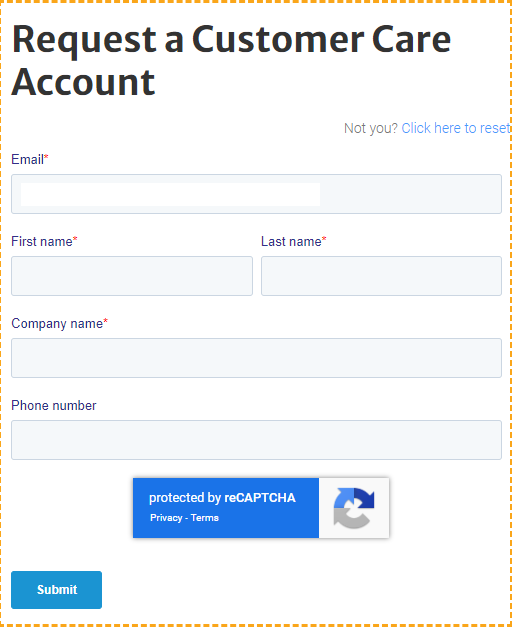
*Please note: If you receive any emails at all regarding customer care tickets in your email inbox, you likely have an account and will only need to follow the above 'reset password' steps in order to obtain access to your customer care account.