Patch Zen v14.11.026.000 - Requirement for WebSell Integration
Overview
To ensure compatibility between Windward System Five and WebSell, you must apply this patch for Zen v14.11.026.000. This patch resolves critical integration issues and ensures smooth data synchronization.
Steps to Apply Patch Zen v14.11.026.000
Step 1: Download the Patch
A windward technician can provide the file. It is called “Zen_Patch_EnterpriseServer-14.11.026.000"
Step 2: Install the Patch
Close Windward System Five on all workstations
Run the updater and press the UNZIP button
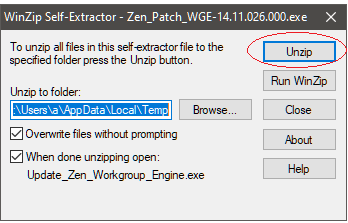
Click the OK button when unzip is done

Click the NEXT button below

Check “I accept the terms in the license agreement” and click the NEXT button below

Finally, click the UPDATE button

Wait for the update to complete. Click YES if you want to restart the server now or NO to restart it later.

Step 3: Restart Computer
It is up to you whether you want to restart immediately or after business hours when every user is logged out of the system. Please note, the patch will only be applied once the computer has been restarted.
Additional Notes
- Ensure you have administrator rights before installing the patch.
- Backup your Windward System Five database before applying any updates.